
ClaiOS Contact Clai
For real estate transaction coordinators

Many moving pieces.
One calm command center.

Your agents. Their accounts. Every deal in motion. Bring documents, deadlines, and follow-ups together in Clai—without losing the personal touch that makes you their go-to TC.

Let’s talk about your TC account

For independent TCs working across agents and brokerages.

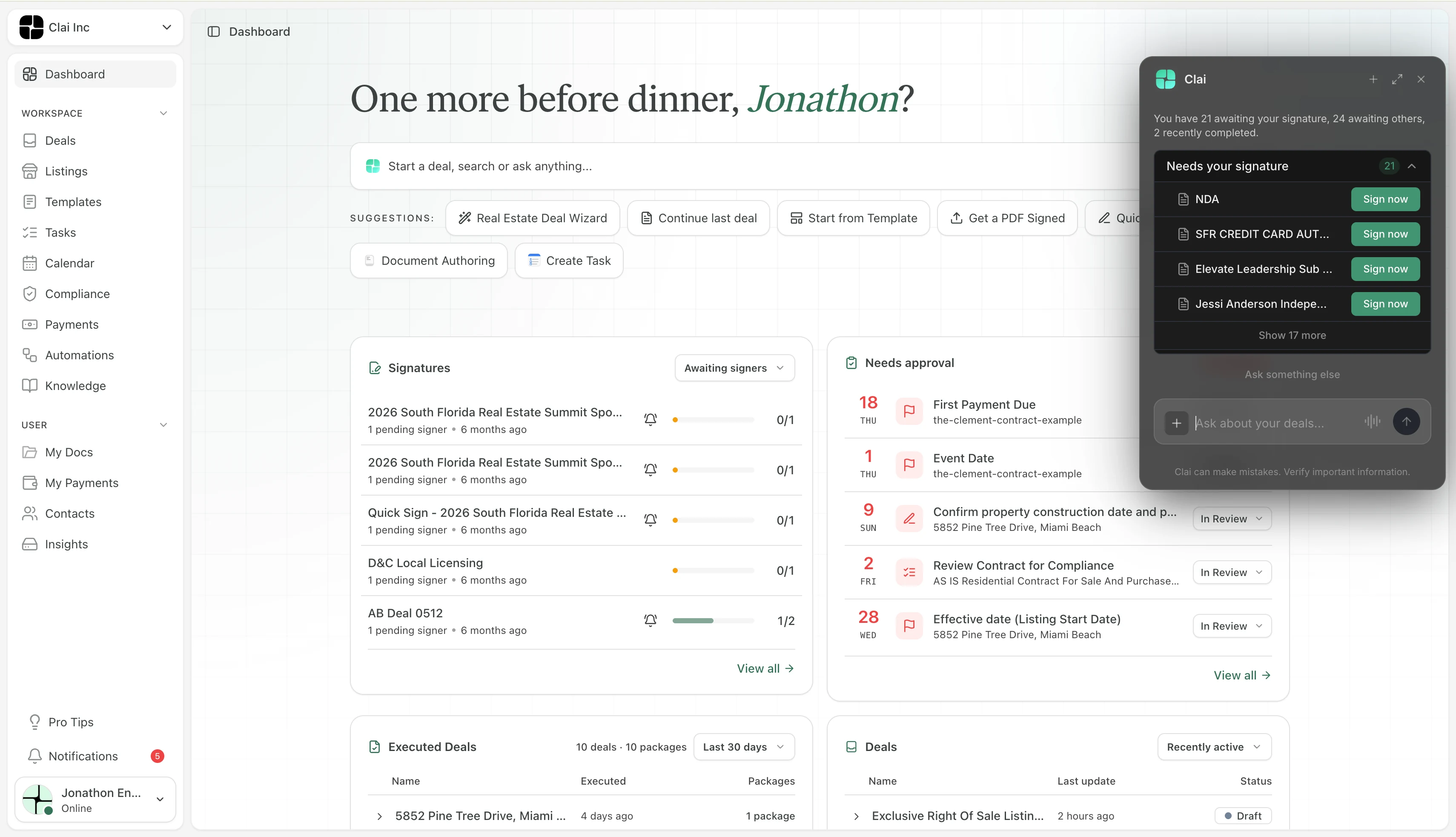
Clai dashboard showing workspace navigation, signatures awaiting signers, items needing approval, executed deals, and the Clai assistant panel.
Actual Clai workspace dashboard showing signatures, approvals, deals, and the Clai assistant.
Multiple accountsDeal-by-deal organizationHuman-approved follow-ups
One TC. More than one account.

Stay close to every deal.
Not buried in every detail.

Working independently means moving between different agents, brokerages, and ways of doing things. Clai gives that coordination a home, with the account and transaction context alongside the work.

  • Coordinate work across agent and broker accounts.
  • Keep each deal’s tasks and documents together.
  • Know whose transaction you’re moving forward.
Example / Per-deal tasks
Avery Lane · Buyer side

184 Willow Lane

A clear next step for each stage.

Collect executed agreementDocument added to deal
Review seller disclosuresCheck signatures and required fields
Due today
Confirm inspection appointmentFollow up with the buyer’s agent
Up next
Example / Document review

Seller disclosures

Review needed
Take a closer lookBuyer acknowledgment appears unsigned. Review the document before requesting a signature.

Suggested check · TC review required

Documents with a next step

From “Where’s that file?”
to “Here’s what’s next.”

Keep transaction documents connected to the deal. Use AI-assisted review to help surface items that need a closer look, then turn your review into the next task or follow-up.

Clai supports your attention to detail. You make the call on what’s complete and what needs another look; AI review is not a substitute for professional judgment or brokerage requirements.

Tell us about your document workflow
The conversation. The file. The next date.

Different accounts.
One connected workday.

Shared inboxes synced with deals, attachments automatically stored in your file vault, and shared calendars. Keep the work connected—even when you’re coordinating for more than one agent.

01 / SHARED INBOXES

A conversation with
the deal beside it.

Work from shared inboxes synced with your deals. Keep the agent, property, and latest reply in view, without piecing together the context each time you switch accounts.

Illustrative UI / Shared inbox · Not a product screenshot
Shared inboxAccount: Avery Lane
Avery LaneRowan & Co. Realty
Synced with deal · 184 Willow Lane
Morgan ReedTo: Avery Lane’s shared inbox

Inspection report · 184 Willow Lane

The report is attached for your review ahead of Friday’s inspection deadline.

Willow-inspection-report.pdfAttachment · Stored in file vault
Deal context   Avery Lane / 184 Willow Lane
02 / FILE VAULT

From attached to filed.

Files and inbox attachments are automatically stored in the file vault. Find the inspection report with the deal—not buried in the thread that delivered it.

Illustrative UI / File vault · Not a product screenshot
File vault184 Willow Lane
Willow-inspection-report.pdfFrom shared inbox · Morgan Reed
Auto-stored
Executed-purchase-agreement.pdfDeal document · Avery Lane
Filed under   Avery Lane / 184 Willow Lane
03 / SHARED CALENDARS

Make room for every deadline.

Manage shared calendars across the agent and broker accounts you support. See appointments and transaction dates together, with a clear sense of which deal needs you next.

Illustrative UI / Shared calendar · Not a product screenshot
Shared calendarAcross your accounts
MON12TUE13WED14THU15FRI16
Inspection response due184 Willow Lane · Avery Lane
Final walkthrough72 Juniper Court · Rowan & Co. Realty

Illustrative workflows with sample names, files, and dates—not live account data or product screenshots. We’ll walk through your account setup and access needs together.

Less starting over. More moving forward.

Your process, with room
for every agent’s preferences.

Give repeatable work a starting point. Keep the details—and the final decision—in human hands.

A head start on the next deal.

Use templates for familiar tasks and transaction stages. Adapt the checklist to the deal, rather than rebuilding your process each time.

Example / Workflow templates
Buyer-side transactionTask checklist
Listing-side transactionTask checklist
Preparing for closingStage checklist

A follow-up, not a leap of faith.

Let Clai help draft the nudge. Review the recipient, context, and wording before approving a message to go out.

Example / Follow-up draft

Hi Morgan, checking in on the inspection receipt for 72 Juniper Court. Could you send a copy when you have it? Thank you.

Awaiting your review and approval

You stay in the loop. Suggested tasks, document checks, and drafted messages support your work—not replace your judgment.

A rhythm for the workday

Open Clai.
Find your next move.

From the first document to the final handoff, keep a practical rhythm across the accounts you support.

  1. Start with the right context.

    Find the agent or broker account and the deal you’re coordinating.

  2. See what needs your attention.

    Review the deal’s tasks, upcoming deadlines, and documents that need a closer look.

  3. Move it forward, on your terms.

    Update the task, review the file, or approve a follow-up. Keep the next step connected to the transaction.

A few things you might be wondering.

Is this for independent transaction coordinators?

Yes. This workflow is focused on TCs coordinating transactions for multiple agents and broker accounts. Tell us how you work so we can discuss the right account setup for your business.

How does working across accounts work?

The goal is to keep each agent or broker account’s transaction context alongside your coordination work. We’ll walk through your account relationships, access needs, and workflow during your inquiry.

Does Clai send follow-ups without my approval?

The workflow described here keeps you in control: Clai helps prepare a draft, and you review the recipient, content, and context before approving it to be sent.

Can I ask about a full free TC account?

Yes. Use the inquiry link below to talk with our team about a full free TC account. We’ll discuss your workflow, account needs, and the details of getting started.

Your coordination deserves a command center.

Bring your accounts.
Let’s make room for your work.

Tell us about the agents and brokerages you support. Let’s talk about a full free TC account and how Clai could fit your day.

A little about your TC workspace

This is an inquiry, not automatic account creation. We’ll follow up about your workflow and a full free TC account. Read our Privacy Policy.

A conversation about your workflow. Not another transaction to manage.